1 Overview
True-Slate is a professional digital clapperboard and timecode slate for film, television and documentary production. It replaces a hardware smart slate: a clean, readable board, broadcast-grade SMPTE timecode, a frame-accurate sync clap, and a shot log you can export straight to the edit.
Who it is for
Second assistant camera / clapper loaders, sound recordists, DITs, script supervisors, and small crews who want proper timecode discipline without a hardware slate and a separate timecode generator.
Requirements
- iPhone or iPad running a current version of iOS / iPadOS.
- The app runs landscape only and full-screen, and keeps the screen awake while it is open.
- The LTC-in feature needs a cable from a timecode source into the device's audio input (a USB-C or Lightning to 3.5 mm adapter; a TRRS cable carries the microphone pin). Everything else works with no accessories.
A note on privacy
True-Slate has no account, no server, no analytics and no advertising. The shot log, settings and productions are stored in a single file on the device and are deleted if the app is removed. Contacts and the microphone are used only on the device and nothing is ever transmitted. See section 20.
2 The slate at a glance
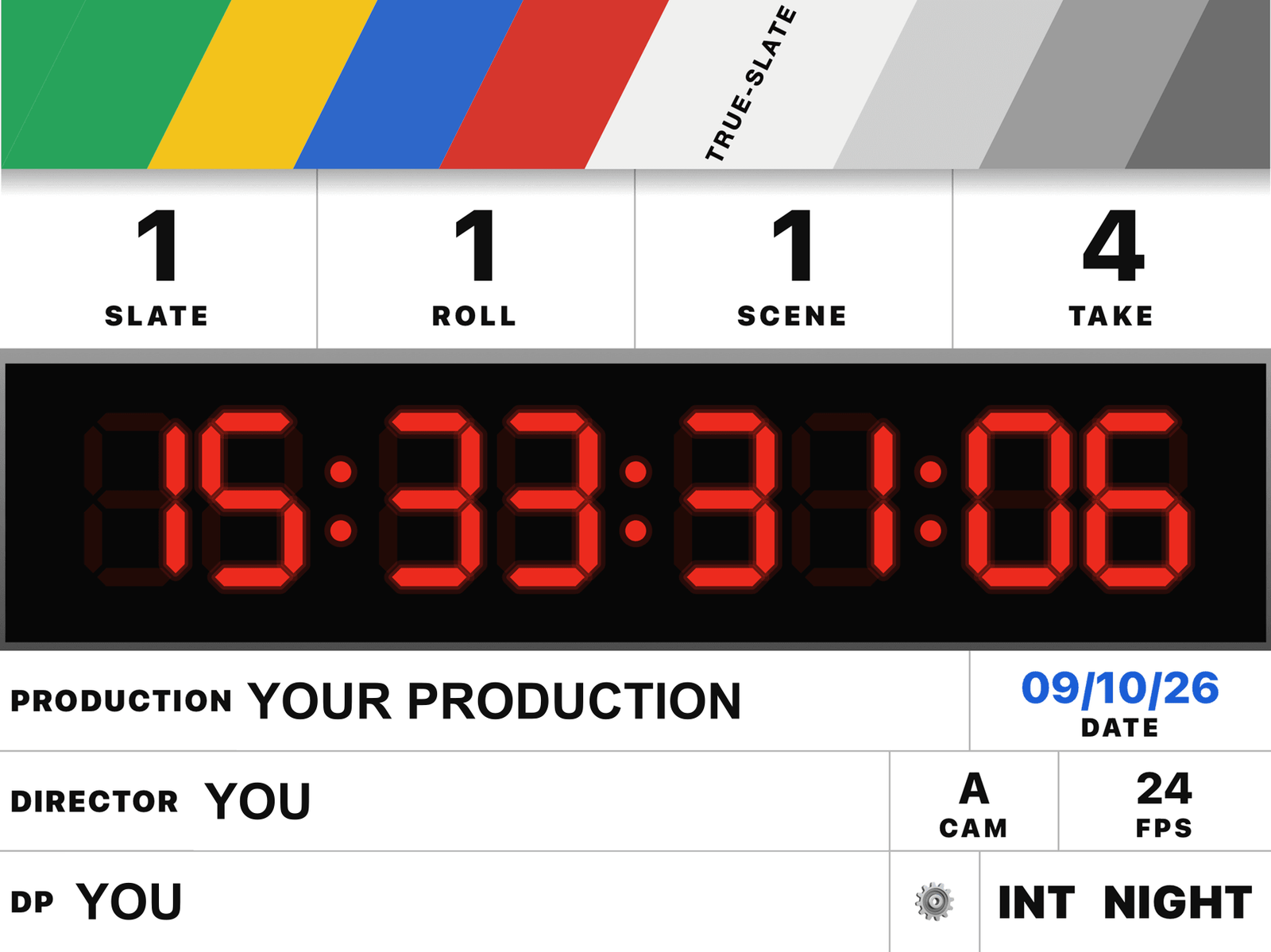
The board fills the screen in four horizontal bands, top to bottom:
Colour clapper (top)
A camera-department colour clapper — wide diagonal green / yellow / blue / red bars into a greyscale wedge, with TRUE-SLATE set on the white bar. The whole band is the tap target that drives the clap cycle (section 3). It does not animate open or shut; the clap is the sound, the haptic and the optional flash.
Number row: SLATE · ROLL · SCENE · TAKE
- Tap a number to open the on-screen keypad (never the system keyboard).
- Swipe up or down anywhere on a cell to step the value — one step per short drag, accelerating if you hold the drag past one second. Horizontal drift is ignored.
- Tap the ROLL label (not the number) to cycle its wording: ROLL → CARD → HDD.
- A cell briefly flashes gold when it changes itself (auto-increment, or an undo).
Timecode panel
A black LCD in a raised grey bezel showing eight seven-segment digits: HH : MM : SS : FF. In drop-frame the last separator becomes a semicolon. Dark "ghost" segments sit behind the lit red digits, exactly as on a hardware slate. Tap the panel to open the JAM keypad (section 6).
Info rows
| Cell | What it is / how to use it |
|---|---|
| PRODUCTION | Tap to open the name editor (section 4). The production name and the slate's PRODUCTION field are the same thing — changing one changes the other. |
| DIRECTOR / DP | Tap to open the name editor, with a History / Snippets / Contacts picker. |
| DATE | The device date, shown in blue. Automatic. |
| CAM | Camera letter. Tap to edit inline (up to two characters, forced upper-case). |
| FPS | The current frame rate. Tap to open the rate picker. |
| Cog (⚙) | Opens Settings. |
| INT / EXT · DAY / NIGHT | On-camera markers. Tap either to toggle it. |
3 The clap cycle
Tapping the colour clapper drives a simple cycle. What the timecode does depends on whether the clock is jammed (section 5).
- First tap — the clap. The clap sound plays with a heavy haptic; the optional white sync flash fires; a row is written to the shot log stamped with the current timecode, scene, slate, take and roll.
- Second tap — cut. A light haptic. If Take after each clap or Slate after each clap is on, the board waits here so you can read the take you just shot.
- Third tap (only when auto-increment is on) applies the increment and the board is ready for the next take. With auto-increment off there is no third tap — a cut returns straight to ready.
Two-stage clap
Settings → Clapper → Two-stage clap. When on, the first tap arms the clapper (a red edge glow) and the second tap makes the clap. Use it to avoid a fumbled early clap on a fast call.
Freeze on clap
Settings → Clapper → Freeze on clap, with a Hold length of 1, 2 or 3 seconds. On a clap the displayed digits hold on the clap frame for that long so the camera records one clean, readable number; the clock keeps running underneath and the display then catches up with no drift.
4 Editing the slate fields
Numbers — the keypad
Tap SLATE, ROLL, SCENE or TAKE to open the compact keypad. Clear sets the value to 0; ⌫ deletes the last digit; the red confirm button applies it. The keypad is bottom-anchored and sized to fit an iPhone in landscape.
Names — PRODUCTION / DIRECTOR / DP
Tap the name to open the editor. It shows the current value, selected, so you can see it and fix a typo:
- Type over it, or tap the ✕ clear button in the field to wipe it.
- Save commits; Cancel discards.
- History lists names you have used before — tap to reuse, star to pin, ✕ to remove.
- Snippets are phrases shared across every text field (managed in Settings → Snippets).
- Contacts (Director / DP only) lets you pick a name from the device address book. Access is requested only the first time you open that tab; the other tabs work without it, and only the name you pick is used.
Camera letter
Tap the CAM cell to edit it in place — up to two characters, upper-cased automatically.
Frame rate
Tap FPS to open the rate picker. Changing rate mid-session preserves the displayed time rather than the raw frame count, so the number on screen does not jump; out-of-range frames are clamped and drop-frame labels are nudged to a legal value.
On-camera markers
Tap INT / EXT to toggle interior / exterior; tap DAY / NIGHT to toggle. The active word is shown solid black.
5 Timecode: modes and the jam model
Source — Free run vs Time of day
Settings → Timecode → Source.
- Time of day — the timecode always follows the device clock. It is always running.
- Free run — a frame counter you set yourself. This is where the jam model applies:
Un-jammed free run — the clapper is a stopwatch
On a fresh session the display sits static at 00:00:00:00. The first clap starts the count; a cut freezes it at the value reached; the next clap resumes from there. This matches a slate with no external reference.
Jammed — the clock runs continuously
Once you jam the clock — from the JAM keypad (Now / Round Up / a typed value) or from incoming LTC — it is locked to that reference and runs continuously. The clapper becomes only a sync mark: clap and cut no longer stop it. This matches a hardware slate jam-synced to a master clock.
Accuracy
The clock is drift-free by construction: the displayed value is always computed from an elapsed interval against a fixed anchor using a monotonic timebase — never accumulated on a repeating timer — so it holds over a long day and a system-clock change cannot make it jump. Drop-frame uses the standard algorithm (two frames skipped at the top of every minute except every tenth; four at 59.94).
6 The JAM keypad
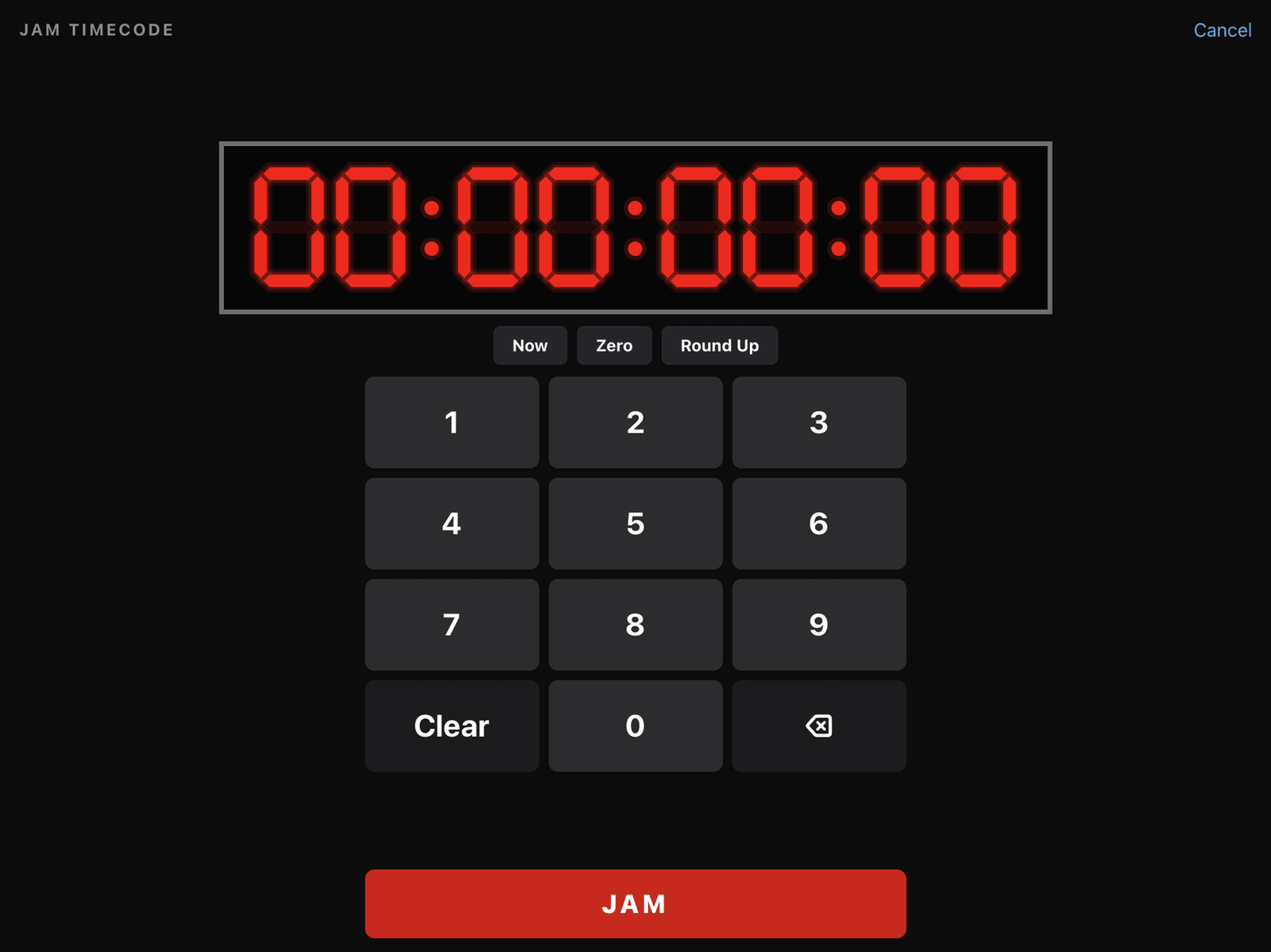
Tap the timecode panel to open it. Digits shift in right-to-left (frames, then seconds, minutes, hours) with a live seven-segment preview. The keypad does not reject digits while you type; it validates once, on JAM, and offers the nearest legal value if a drop-frame entry lands on a skipped frame.
| Control | Effect |
|---|---|
| JAM | Locks the clock to the typed value. It then runs continuously from there. |
| Now | Jams to the current time of day and runs. |
| Round Up | Jams to the next whole minute — use it to start two devices together on a count. |
| Zero | Resets the display to a static 00:00:00:00 without jamming. The keypad stays open so you can retype a value or Cancel out. Use it to undo a mistyped jam. |
| Release | Shown only while jammed. Drops the jam: the clock freezes at its current value and hands control back to the clapper stopwatch. |
| Cancel | Closes the keypad with no change. |
7 LTC jam sync (input)
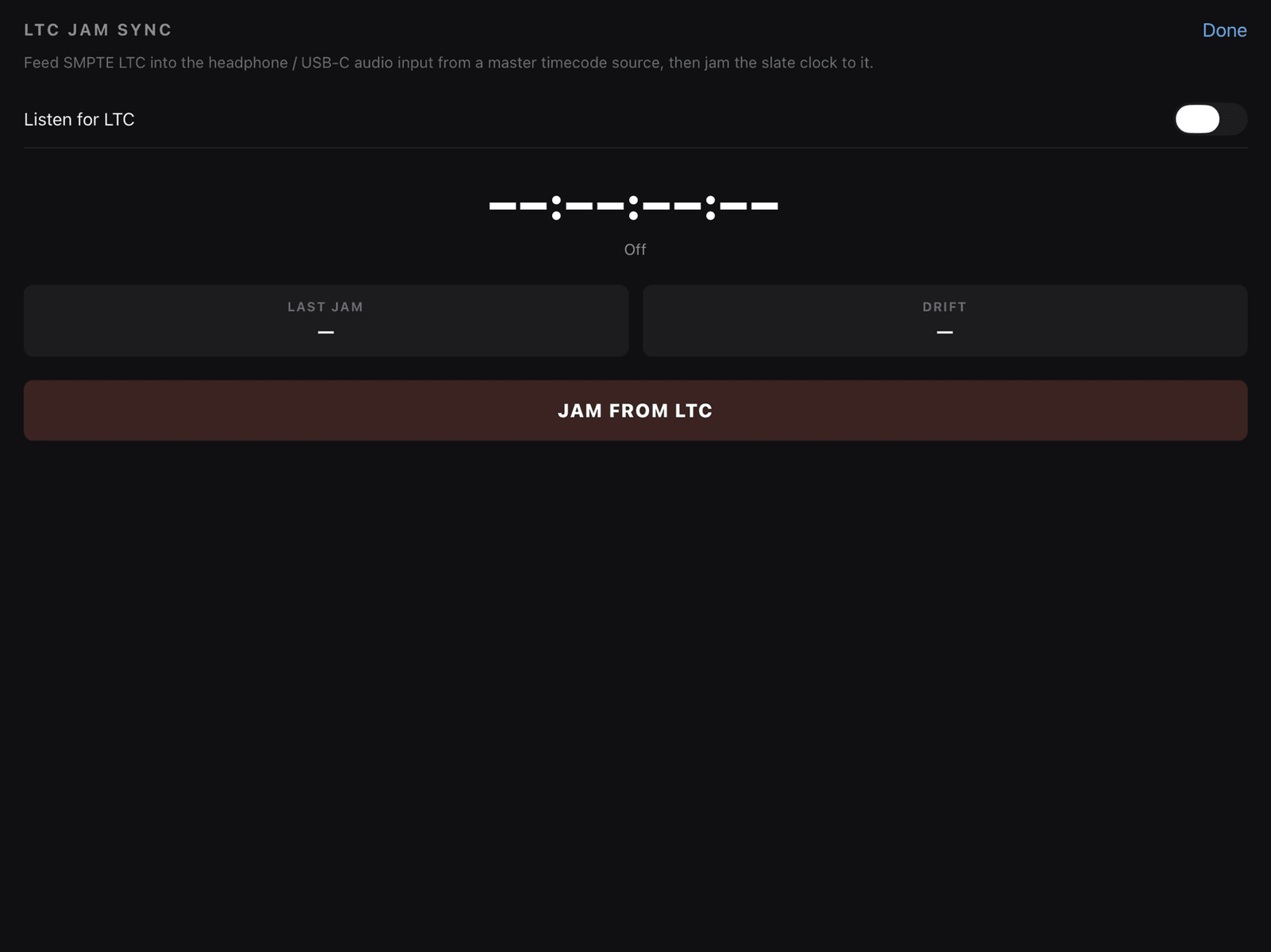
Read SMPTE Linear Timecode from an audio source to jam the slate from a master clock.
Setting up
- Settings → Timecode → LTC jam sync → Set up.
- Turn on Listen for LTC and allow microphone access when asked. The audio is decoded live on the device only; it is never recorded or sent anywhere.
- Connect a cable from the timecode source's LTC output into the device's audio input, via a USB-C or Lightning to 3.5 mm adapter.
- Set the app's frame rate to match the source.
Reading it
- The sheet shows the incoming timecode and a status line: Listening — no LTC signal, then Locked when it decodes.
- Last jam shows the time since you last jammed; Drift shows how far the running clock has slipped from the incoming LTC since that jam, in frames.
- Tap JAM FROM LTC to set the slate clock to the incoming value. From then on it runs continuously (jammed), and the drift readout starts from zero.
8 LTC out (output)
Generate SMPTE LTC audio from the running clock so a recorder or camera can jam from the slate.
- Settings → Timecode → LTC out → Set up.
- Run a cable from the device's headphone / USB-C audio output into the timecode input on the recorder or camera.
- Tap START LTC OUT. The device plays a continuous LTC tone; the readout shows the timecode going out and tracks the slate clock.
- Output offset (−25 / −5 / +5 / +25 ms) compensates for the device's audio output latency — nudge it so the receiving device reads the right frame.
- STOP ends output cleanly. LTC out also stops if the app is sent to the background.
9 Clap sync and self-test
Sync flash
Settings → Clapper → Clap sync flash. On a clap the whole clapper band flashes flat white for about two frames, with sharp on/off edges — a visual sync reference the camera can be measured against.
Sync self-test / offset calibration
Settings → Clapper → Sync self-test. Record the slate on the camera, measure the real-world gap between the beep and the visual clap, and enter it here. The stored offset (±250 ms) is then applied to every clap: whichever of the beep or the flash is early is held back so the two land on the same frame. A live line shows the offset in frames at the current rate.
MOS mode
Settings → Clapper → MOS (no clap sound). Silences the clap — the haptic still fires so the operator feels the hit — and the take is understood as MOS.
Second sticks
When a first clap is spoiled, you re-clap the same take. Mark that logged row as second sticks in the shot log (section 10) so the editor knows which clap to use; the take number is not advanced.
10 Shot log and take log
Every clap is logged automatically. Open it from Settings → Data → Take log.
What is logged
Date and time, timecode at the clap, scene, slate, take and roll — up to 500 rows.
Rating and notes
With Settings → Data → Shot log notes & ratings on (the default):
- Tap a row to expand it. The editor has Print (circle the take), NG (no good), a free-text note field, a 2nd sticks toggle, and Delete.
- Circled takes show a green badge; second-sticks takes show a gold "2ND STICKS" badge.
- The header has an All / Prints filter and a summary line: N takes · N prints · N NG · N 2nd sticks.
- Turn the setting off and the take log is a plain read-only list.
11 Exporting
In the take log, tap Export. Exports honour the current All / Prints filter.
| Format | Use |
|---|---|
| CSV | A spreadsheet, one row per take — every field, notes and ratings escaped so a comma or quote in a note cannot break the columns. |
| ALE | Avid Log Exchange — import the log straight onto clips in the edit. Circled / NG state and notes are carried in the description. |
| Camera report | A printable PDF camera report, laid out from the slate fields, with circled rows highlighted and NG rows dimmed. |
| Sound report | A matching printable PDF sound report. |
Each export opens the iOS share sheet — AirDrop it, email it, or save it to Files or a cloud drive.
12 Productions and presets
Settings → Data → Productions, or tap a name on the slate.
- Add a production with a name and an optional preset: Custom, Film 24, PAL 25, NTSC 29.97 DF, or Doc / ENG. The preset sets the frame rate and timecode source for you.
- The production name is the slate's PRODUCTION field — create or rename a production and the board updates; edit PRODUCTION on the board and the production is renamed.
- Tap the dot to switch productions — each keeps its own full slate setup, so you can move between jobs without retyping. Tap a name to rename it.
13 Scene and take numbering
| Setting (Auto-increment) | Effect |
|---|---|
| Take after each clap | Bumps the take number one cut after each clap. The board pauses on the cut so you can read the take before it rolls. |
| Slate after each clap | Bumps the slate number the same way. |
| Reset take to 1 on scene change | When the scene changes, the take returns to 1. |
| Scene letter suffixes | On: the SCENE +/− steps 8 → 8A → 8B … and 8Z → 9. Off: it steps the number only (8 → 9), dropping any letter. |
An undo pill appears briefly after any automatic or gesture change — tap it to revert that one change.
14 Tail slate
Settings → Display → Tail slate (flip 180°). Flips the whole board upside down for an end-of-take slate, with a red "TAIL SLATE" pill. Settings and the keypads stay upright for the operator. Turn it off to flip back.
15 Dark set mode
Settings → Display → Dark set dimming — Off / Low / Med / High. Dims the screen for a low-light scene so the white board does not clip to pure white on camera. It lowers the device brightness where allowed and lays a black overlay over the board, so it works either way. Brightness is restored when you leave the slate.
16 Setup guard
Settings → Setup → Setup guard. On the first clap of a session, if PRODUCTION, DIRECTOR or DP are still on their placeholder values, a prompt names the unset fields and offers Review fields or Continue anyway — so placeholder text never ends up on every report for the whole shoot. It asks once per launch.
17 Reverse-side notes
Settings → Data → Reverse side notes. A plain scratchpad — continuity notes, contacts, anything you would chalk on the back of a real board. Saved with the slate.
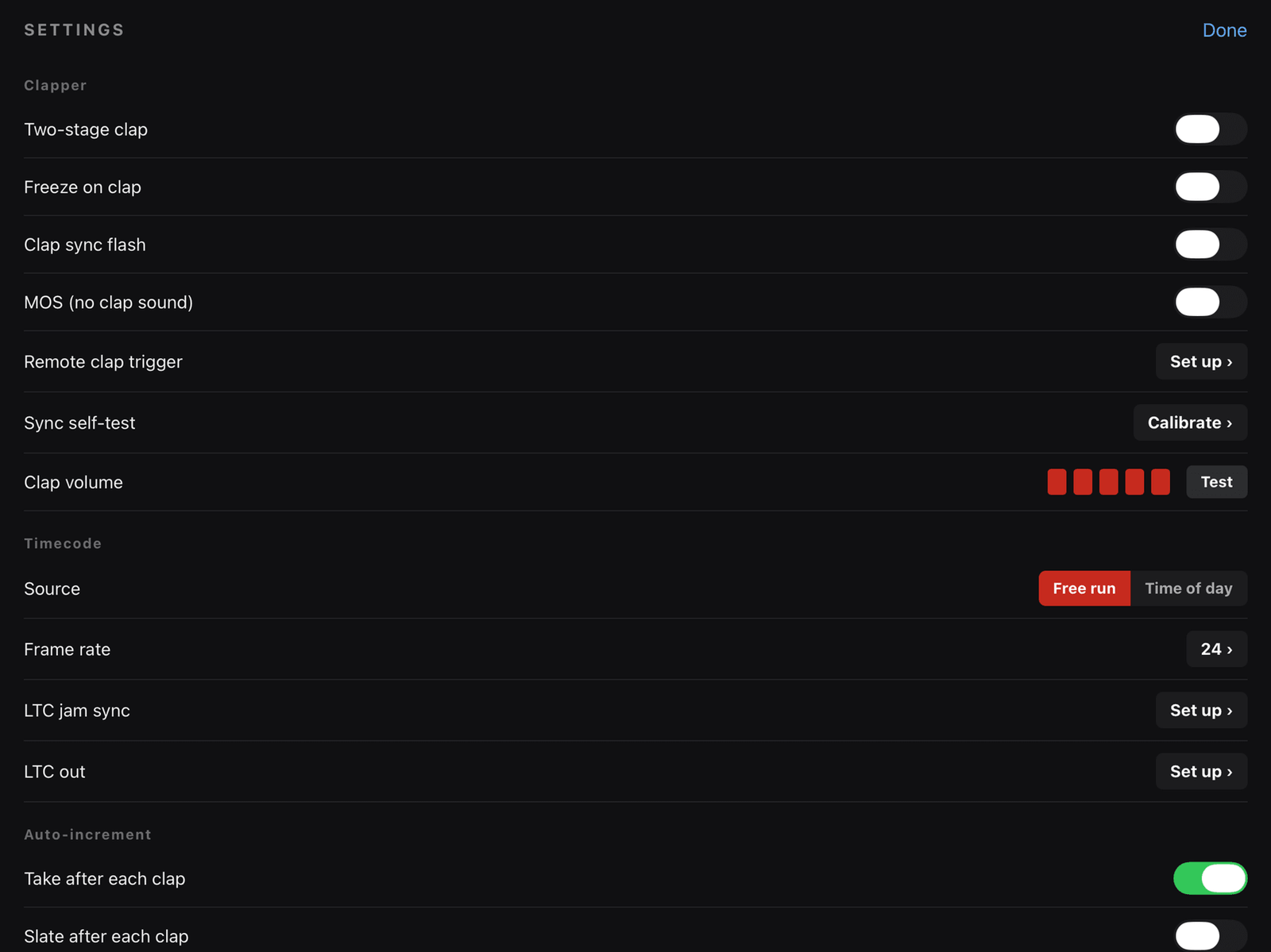
18 Settings reference
| Section / setting | What it does |
|---|---|
| Clapper · Two-stage clap | First tap arms, second taps claps. |
| Clapper · Freeze on clap | Hold the readout on the clap frame (1–3 s). |
| Clapper · Clap sync flash | White band flash on each clap. |
| Clapper · MOS | Silence the clap; log as MOS. |
| Clapper · Sync self-test | Measure and store the beep-to-flash offset. |
| Clapper · Clap volume | Set the clap level; Test plays it. |
| Clapper · Remote clap trigger | Fire the clap from a paired Bluetooth remote / page-turner key. |
| Timecode · Source | Free run or Time of day. |
| Timecode · Frame rate | The rate picker. |
| Timecode · LTC jam sync | Listen for LTC in; jam from it. |
| Timecode · LTC out | Generate LTC out. |
| Auto-increment · Take / Slate after each clap | Bump the number after each cut. |
| Auto-increment · Reset take to 1 on scene change | Take returns to 1 with a new scene. |
| Auto-increment · Scene letter suffixes | 8, 8A, 8B… vs numeric only. |
| Display · Tail slate | Flip the board 180°. |
| Display · Dark set dimming | Off / Low / Med / High. |
| Setup · Setup guard | Placeholder-field check on the first clap. |
| Data · Reverse side notes | Scratchpad. |
| Data · Shot log notes & ratings | Enable rating / note editing in the take log. |
| Data · Take log / Snippets / Productions | Open each manager. |
19 Frame rates
15, 23.976 NDF, 24, 25, 29.97 DF, 29.97 NDF, 30 DF, 30 NDF, 50, 59.94 DF, 60, 72, 100, plus a custom rate (1–240 fps). Drop-frame is implemented with the standard Heidelberger algorithm.
20 Privacy and data
- No account, no sign-in, no server, no analytics, no advertising.
- The slate, settings, shot log, notes, name history and productions are stored in one file on the device and removed if the app is deleted.
- Contacts: read on the device only, to show the Director / DP pick list. Requested only when you open that tab. Only the name you choose is used. Never uploaded.
- Microphone: opened only while LTC jam sync is on, to decode timecode live on the device. Never recorded, saved or transmitted; closed again when you turn the feature off.
- Exports go to the iOS share sheet for you to send or save wherever you choose.
Full policy: true-slate.com/true-slate-privacy.html
21 Support
Questions or a problem: support@true-slate.com — please include the device model, iOS version and app version.
Support page: true-slate.com/true-slate-support.html